Deine Lüftung in Home Assistant.
Your ventilation in Home Assistant.
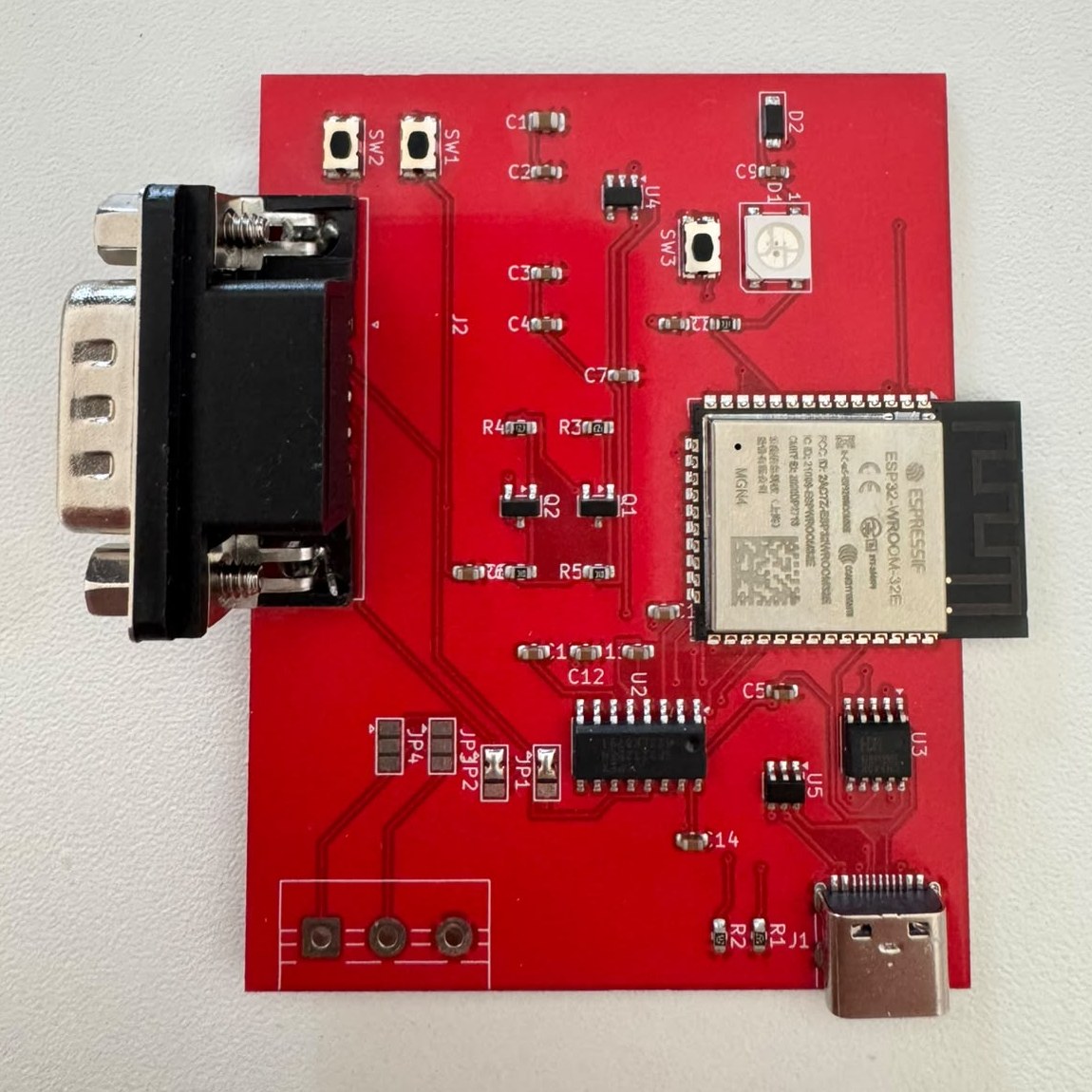
Eine kleine ESP32-Platine für die RS232-Schnittstelle von Zehnder ComfoAir, StorkAir WHR und Wernig G90. Lokal, ohne Cloud, ohne MQTT — mit ESPHome.
A small ESP32 board for the RS232 port of Zehnder ComfoAir, StorkAir WHR and Wernig G90 units. Local, no cloud, no MQTT — powered by ESPHome.
Was sie kann
What it does
Alles, was das Gerät über die Schnittstelle preisgibt, landet als Entität in Home Assistant — über 40 Stück.
Everything the unit exposes over the serial port becomes an entity in Home Assistant — over 40 of them.
Native Anbindung
Native integration
ESPHome-API mit Verschlüsselung. Home Assistant findet die Platine selbst.
Encrypted ESPHome API. Home Assistant discovers the board automatically.
Alle Messwerte
All readings
Vier Temperaturen, Stufe, Leistung und Drehzahl, Bypass, Filter, Frostschutz, Betriebsstunden.
Four temperatures, level, fan power and rpm, bypass, filter, frost protection, operating hours.
Steuern
Control
Stufe 0–3, Komforttemperatur, Stufenwerte. Zeitpläne und Automationen in Home Assistant.
Level 0–3, comfort temperature, fan percentages. Schedules and automations in Home Assistant.
Bedienteil wählbar
Wall panel your way
CC-Ease parallel weiter nutzen oder dunkel schalten — ein Schalter in Home Assistant.
Keep the CC-Ease in parallel or switch it dark — one switch in Home Assistant.
Webinterface
Web interface
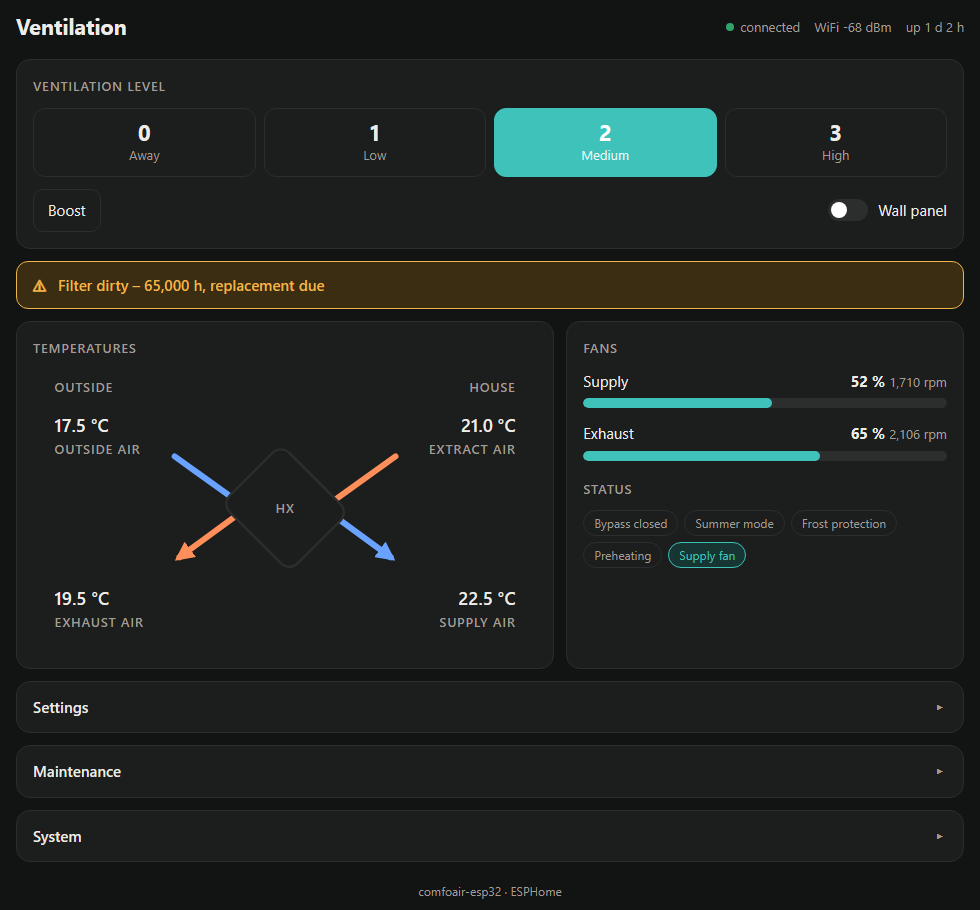
Eigene Oberfläche mit Wärmetauscher-Schaubild: ablesen, bedienen, einstellen, Firmware-Update — mit Anmeldung, auch ohne Home Assistant.
Custom UI with heat exchanger diagram: read, control, configure, update firmware — with login, even without Home Assistant.
Offen
Open
Schaltplan, KiCad-Projekt und Fertigungsdaten frei unter CERN-OHL-S. Updates über WLAN.
Schematic, KiCad project and production files under CERN-OHL-S. Over-the-air updates.
In Home Assistant
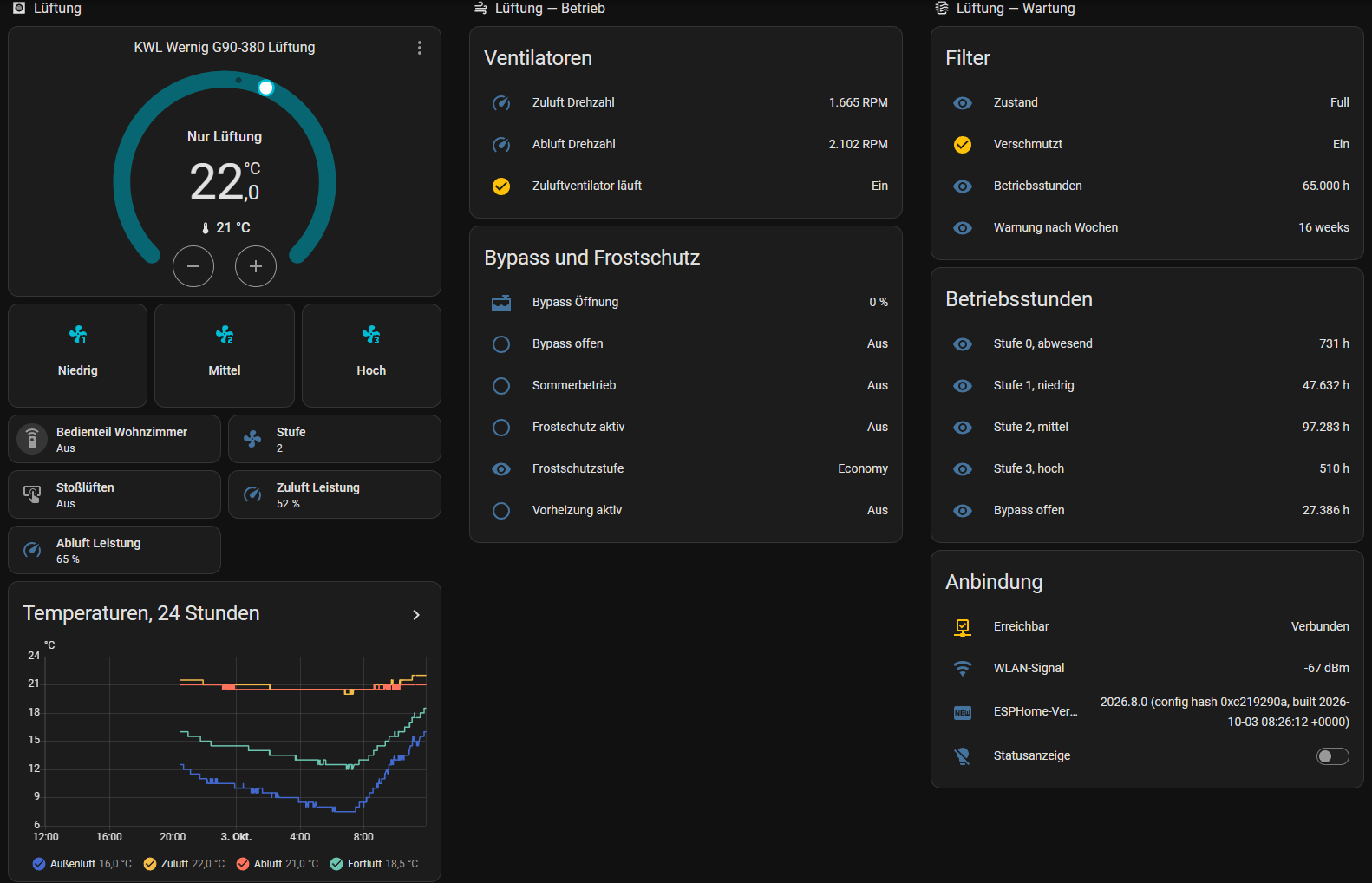
So sieht es im Dashboard aus: Stufenknöpfe, Schalter für das Bedienteil, Ventilatoren, Bypass, Filter, Betriebsstunden, Temperaturverlauf.
This is how it looks on a dashboard: level buttons, wall panel switch, fans, bypass, filter, operating hours, temperature history.
Weboberfläche
Web interface
Direkt auf der Platine, im Browser am Handy oder PC — auch ohne Home Assistant. Mit Anmeldung, ohne Internet.
Right on the board, in the browser on phone or desktop — even without Home Assistant. With login, no internet needed.
Hardware
| Größe | Size | 70 × 55 mm |
| Prozessor | MCU | ESP32-WROOM-32E |
| Pegelwandler | Level shifter | MAX3232, 2 Kanälechannels |
| Versorgung | Power | 5 V USB-C, < 1 W |
| Anschluss Gerät | Unit port | DB9-Stecker, DTE (Pin 2 RX, 3 TX, 5 GND)DB9 male, DTE (pin 2 RX, 3 TX, 5 GND) |
| Zweiter Kanal | Second channel | Schraubklemme, 3-polig3-pin screw terminal |
| USB | CH340K, Auto-Resetauto reset, USBLC6 | |
| Extras | Extras | Status-LED, Taster, RX/TX-Lötbrückenstatus LED, button, RX/TX solder jumpers |
Kompatible Geräte
Compatible units
Die meisten Angaben im Netz sind voneinander abgeschrieben. Hier steht ehrlich, was nachgewiesen ist und was nur gelistet.
Most claims online are copied from each other. This list is honest about what is verified and what is only listed.
| Gerät | Unit | Marke | Brand | Status |
|---|---|---|---|---|
| G90-380 (CS / Luxe) | Wernig | mit dieser Platine nachgewiesenverified with this board | ||
| G90-160 | Wernig | nachgewiesenverified | ||
| ComfoAir 350 | Zehnder | nachgewiesenverified | ||
| ComfoAir 160 | Zehnder | nachgewiesenverified | ||
| ComfoD 450 | Zehnder | nachgewiesenverified | ||
| G90-200 CS | Wernig | wahrscheinlichlikely | ||
| ComfoAir 200 / 500 / 550 | Zehnder | wahrscheinlichlikely | ||
| ComfoD 300 / 350 / 550 | Zehnder | wahrscheinlichlikely | ||
| WHR 920 / 930 / 950 / 960 | J.E. StorkAir | wahrscheinlichlikely | ||
| Santos 370 DC | Paul | wahrscheinlichlikely | ||
| G90-300 | Wernig | ungeprüftunknown | ||
| ComfoAir Q350 / Q450 / Q600, Q350 / Q600 | Zehnder / Wernig | nicht kompatibel (CAN)not compatible (CAN) | ||
| ComfoAir E300 / E350 / E400 | Zehnder | nicht kompatibel (Modbus)not compatible (Modbus) | ||
| Novus 300 | Paul | nicht kompatibel (RS485)not compatible (RS485) | ||
| Vitovent 300-W | Viessmann | nicht kompatibelnot compatible |
So prüfst du dein Gerät
How to check your unit
- Typenschild: eines der Modelle oben. „Q“ oder „E“ im Namen heißt: passt nicht.
- Bedienteil: CC-Ease, CC-Luxe oder alte ComfoSense sind gute Zeichen. ComfoConnect oder Touch-Display deuten auf die Q-Plattform.
- Steuerplatine: CA350 / CA550 mit Anschluss „RS232“ oder „RS232 PC“. Manchmal RJ45 oder Klemmen statt DB9 — dann braucht es ein Adapterkabel.
- Nicht verwechseln: Die RS485-Klemmen („Entalpy“, „Hybalans“) auf der Wernig-Konnektorplatine sind für Zubehör, nicht der PC-Anschluss.
- Type plate: one of the models above. A "Q" or "E" in the name means it will not fit.
- Wall panel: CC-Ease, CC-Luxe or the old ComfoSense are good signs. ComfoConnect or a touch display point to the Q platform.
- Control board: CA350 / CA550 with a port labelled "RS232" or "RS232 PC". Sometimes RJ45 or terminals instead of DB9 — then you need an adapter cable.
- Don't confuse: the RS485 terminals ("Entalpy", "Hybalans") on the Wernig connector board are for accessories, not the PC port.
Ein „wahrscheinlich“-Gerät getestet? Bitte ein Issue anlegen — es wandert dann zu „nachgewiesen“.
Tested a "likely" unit? Please open an issue — it will move to "verified".
Platine bekommen
Get a board
Fertig bestückt und geprüft
Assembled and tested
DB9 und Schraubklemme gelötet, Lötbrücken gesetzt, Firmware aufgespielt — anstecken, ins WLAN, fertig.
DB9 and screw terminal soldered, jumpers set, firmware flashed — plug in, join WiFi, done.
Fertige Platinen sind in Vorbereitung. Melde dich unverbindlich — mit Gerätemodell und Land, dann sage ich Bescheid, sobald es losgeht.
Ready-made boards are in preparation. Get in touch — no obligation — with your unit model and country, and I will let you know when they are available.
Interesse anmelden Register interestSelbst bauen
Build it yourself
Gerber-, Stücklisten- und Bestückungsdaten für JLCPCB liegen im Repository, Dreh- und Lagekorrekturen schon eingetragen. Selbst zu löten sind nur DB9 und Schraubklemme — und die Lötbrücken JP1/JP2 auf Pad 1–2 schließen.
Gerber, BOM and placement files for JLCPCB are in the repository, with rotation and offset corrections applied. You only solder the DB9 and screw terminal — and close jumpers JP1/JP2 on pads 1–2.
Anleitung GuideDas Bedienteil
The wall panel
Gemessen an einer CA350 mit Firmware 3.20: Der oft genannte Modus 1 „nur PC“ wird ignoriert. Modus 3 „PC Master“ schaltet das CC-Ease dunkel; zurück auf Modus 2 ist es wieder aktiv, und Home Assistant kann trotzdem schalten. Ein Schalter in Home Assistant wählt zwischen beidem und stellt die Wahl nach einem Stromausfall selbst wieder her.
Measured on a CA350 with firmware 3.20: the often quoted mode 1 "PC only" is ignored. Mode 3 "PC master" turns the CC-Ease dark; back in mode 2 it is active again and Home Assistant can still switch levels. A switch in Home Assistant picks either and restores the choice after a power cut.